
How to set up Airport Landing Prices
Airport landing prices let you create per-airport fees for Full stop, Touch-and-go, Approach, and Go-around landings. You enter all four landing types in one operation. Charges post to UBM at the normal posting point (same as aircraft pricing). Any landing type can be set to 0 if it should not be charged.
Set up airport landing prices
-
Go to Administration → Airports and click Prices on the relevant airport.
-
Click + Create airport price.
-
Enter prices for Full stop, Touch-and-go, Approach, Go-around (set non‑applicable types to 0).
-
(Optional) Toggle Affected by discount number to multiply charges by the user’s discount number (default Off).
-
Click Create airport price to save.
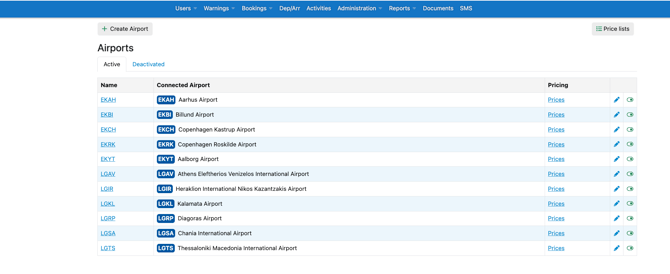
You’ll see a full overview of all airports in your account. Find the airport you want to edit, then click Prices corresponding to that airport to access the pricing settings.

Click + Create airport price to set up a new pricing configuration for that airport
(Optional) Toggle Affected by discount number if these airport prices should be multiplied by the user’s discount number (default Off).
Click Create airport price to save.
Tip: After creation, the + Create airport price button is disabled for that airport to prevent duplicates.
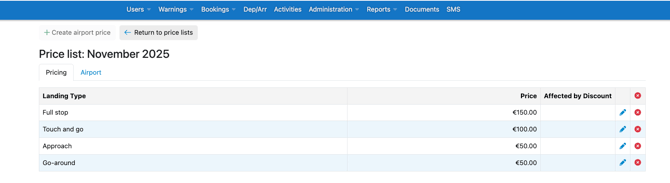
Before you begin
-
UBM is enabled for your organization.
-
You have permission to manage Prices in Administration.
-
Airports exist in Administration → Airports and are selectable on flight records.
-
(Optional) Discount feature is enabled if you intend to use discount numbers.
Where to configure
-
Go to Administration → Airports.
-
Use the Pricing column to open Airports → Prices for the selected airport.
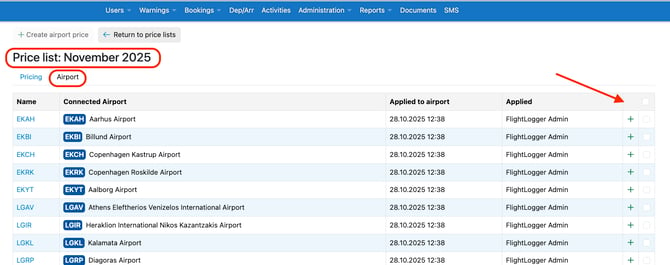
After initial creation, the + Create airport price button is shaded/disabled to prevent creating multiple price sets for the same airport.
Create airport landing prices
-
Open Administration → Airports → Prices for the target airport.
-
Select + Create airport price.
-
Enter the prices for all four landing types (Full stop, Touch-and-go, Approach, Go-around).
-
(Optional) Enable Affected by discount
-
Default: Off.
-
-
Click Create airport price to save.
Airports → Prices form (create all four landing types in one go)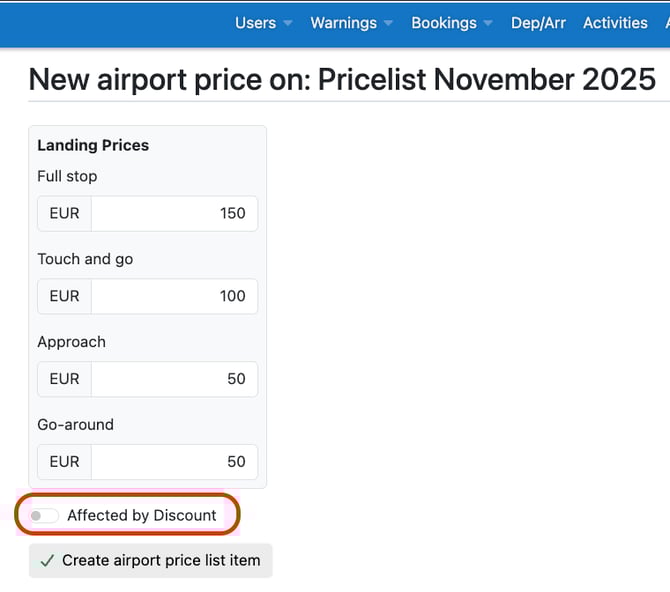
Need help?
If you want to hear more or you have any further questions, please write to support@flightlogger.net