
The Combined Syllabus Builder lets you create training programs where flight lessons and ground training sessions belong to the same overall syllabus structure.
This is useful for schools that want their training program to reflect how training is delivered in real life, where flight and ground training are often connected rather than managed as completely separate tracks.
With a Combined Syllabus program, both flight and ground training can be organised within phases, giving instructors, administrators, and students a clearer structure to follow.
Before you start
Before creating a Combined Syllabus program, please note:
- Combined Syllabus currently supports the creation of new combined programs.
- You can bring sessions in from an existing flight training or ground training program using Import from Existing program (see below), but converting an existing program directly into a Combined Syllabus program is not yet possible.
- You need permission to manage programs in FlightLogger.
If you already have an existing flight training or ground training program, you can use Import from Existing program to bring its lessons into your Combined Syllabus program instead of adding them one by one. See Import lessons from an existing program below.
What is a Combined Syllabus program?
A Combined Syllabus program allows your school to build one program structure that includes both:
- Flight training lessons
- Ground training sessions
This means both types of training can be placed inside the same phase structure, making it easier to build a program that follows the actual training journey.
Instead of maintaining separate flight and ground programs, you can create one connected syllabus where all relevant training belongs together.
Creating a Combined Syllabus program
To create a new Combined Syllabus program:
- Go to Administration
- Select Programs
- Click Create
- Select Combined
- Enter the name of your program
- Complete the required program setup fields
- Click Create Program
Once the program has been created, you can start building the structure with revisions, phases, lessons, and ground training content.
Create the first revision
After creating the program, create the first revision.
- Open the newly created Combined Syllabus program
- Click Create revision
- Enter the revision number and any relevant revision details
- Configure the available program settings
- Save the revision
The revision is where you build and maintain the active structure of the program.
Set up phases
Phases help divide the program into logical sections.
For example, a Combined Syllabus program could include phases such as:
- Phase 1: Basic training
- Phase 2: Navigation
- Phase 3: Advanced training
- Phase 4: Final preparation
To add phases:
- Open the program revision
- Use the default phase or click Create phase
- Enter the phase name
- Save the phase
- Repeat until your required phase structure is ready
Both flight and ground training can be organised within these phases.
Add flight and ground training content
Once your phases are ready, you can begin adding the training content.
Add flight lessons where students will complete practical flight training, and add ground training sessions where theoretical or classroom-based training should be included in the same program flow.
When building your content, make sure each lesson or session is placed in the correct phase and that syllabus time, briefing content, and other required information are filled in where relevant.
This helps ensure the program overview gives a clear picture of the full training structure.
If you need to add many lessons at once, for example a full ground school subject with 30 lessons, see Import lessons from an existing program below instead of adding them one at a time.
Import lessons from an existing program
If a subject or set of lessons already exists in one of your other flight training or ground training programs, you can bring it into your Combined Syllabus program instead of building it from scratch.
1. Open the revision you want to add content to.
Note: This only works on a revision that has no students attached yet. Once a revision has students on it, it is locked, and the same rules apply as for regular training programs. See Editing Training Programs: Major vs. Minor Changes.
2. Select the phase you want the imported content added to.
3. Click Import from Existing program in the top bar.
4. Select the flight training or ground training program you want to import from.
Note: This imports the entire source program's lessons into the selected phase. You cannot choose individual subjects or lessons to bring in on their own. If you only need part of the source program, delete the lessons you don't need after the import.
Once the import finishes, review the imported lessons alongside your existing content, and check phases, syllabus times, and briefing content as described below.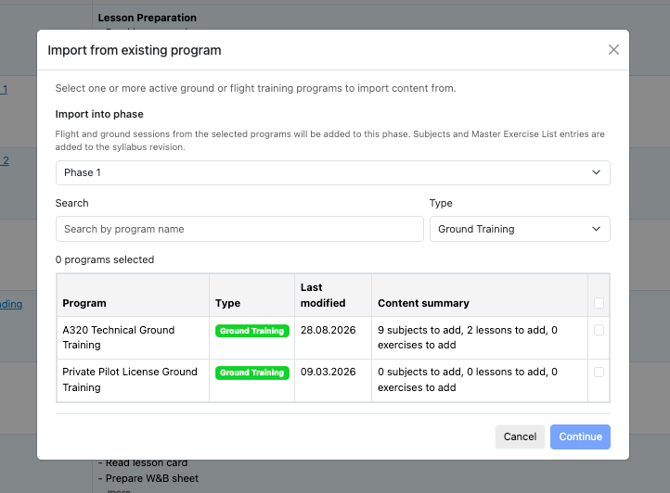
Review the syllabus structure
Before assigning students, review the program carefully.
Check that:
- All required phases have been created
- Flight lessons are placed in the correct phases
- Ground training sessions are placed in the correct phases
- Syllabus times are correct
- Briefing content, documents, and links are added where needed
- The program structure matches your approved training manual or internal training plan
Tip: If your school is building a Combined Syllabus program from an existing training setup, keep the old program open as a reference while creating the new structure.
Assign students to the Combined Syllabus program
Once the Combined Syllabus program is ready, students can be assigned to the program and training can begin.
Use the same general workflow your school normally uses for assigning students to programs in FlightLogger.
After assigning students, the program can be used for bookings, training registrations, and progress follow-up.
Bringing in existing content
Combined Syllabus programs can't be converted from, or merged with, existing flight or ground training programs directly — but you can import lessons from an existing program into a revision. See Getting started with Combined Syllabus for the steps.
Need help?
If you are unsure how to structure your Combined Syllabus program, or if you need help assigning students after creating the program, please contact FlightLogger Support using the Get Support button inside FlightLogger.