
Generate AI descriptions for exercises
With the new Generate Descriptions for All Exercises feature, administrators can quickly generate AI-powered descriptions for all exercises in a program with just one click.
This helps schools and training organizations save time while ensuring exercises contain clear and consistent descriptions for students and instructors.
How to generate descriptions for all exercises within a training program
-
Navigate to the program’s Master Exercise List
-
Click the Generate descriptions for All Exercises button
-
Wait for a few minutes and refresh the page
- See the AI-generated exercise descriptions that FlightLogger has made for all exercises
This is a fast and efficient way to populate exercise content across an entire training program.
Generate descriptions individually for each exercise
If you only want to generate a description for a single exercise, you can do this individually:
-
Open the relevant exercise
-
Click edit.
-
Click the Generate description AI button below the description textbox
This allows you to selectively generate descriptions only where needed.
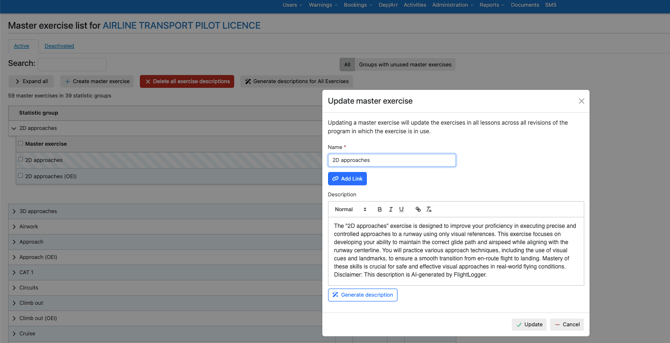
NOTE
AI-generated content is to be used with care. The validity of exercise descriptions is your own responsibility, and we recommend that you always verify AI-generated content before publishing.
Edit existing exercise descriptions individually
All generated descriptions can be manually edited afterwards.
To edit an exercise description:
-
Click on the relevant Statistic Group
-
Locate the exercise
-
Click the Edit icon (pencil icon)
-
Update the description as needed
-
Save your changes
This gives full flexibility to customize the AI-generated content to match your organization’s training standards and terminology.
Once published, the exercise descriptions can be opened by clicking the Info-icon on the grading tab of flight lessons.
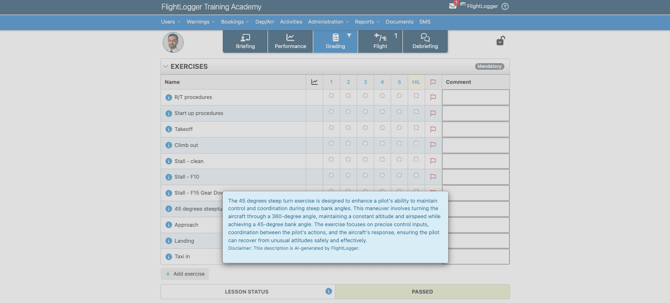
Add video and image links for each exercise
Exercises can also include helpful external resources such as:
-
Training videos
-
Instructional images
-
Reference material
When editing an exercise, click Add Link to insert a link related to the exercise topic.
For example, you can link to:
-
A video explaining airspeed
-
A training video demonstrating a stall
-
Images illustrating procedures or maneuvers
This makes it easier for students to access supporting learning material directly from the exercise description.
Quick action - Generate AI exercise descriptions for all exercises on your FlightLogger account with one click
Navigate to the Account Settings of your FlightLogger account, and under General Settings, you'll find the area AI Exercise Descriptions (one-time, irreversible).
Clicking here will generate AI exercise descriptions for all exercises on your FlightLogger account, and the action is irreversible.