
Interactive walkthrough
Follow along with this step-by-step walkthrough of the full registration process, from selecting the booking to reviewing attendance across a class.
Proceed with the booking
- Review session from your booking overview.
- Click Proceed to confirm the booking and open the ground training session.
Adding documents
You can attach any training materials used during the session, such as slides or handouts.
- Click Attachments.
- Upload the relevant document(s).
Note: Uploaded documents are stored on the session and remain available to students afterward.
Setting the session time
If the session ran longer or shorter than originally booked, update the end time:
- Click the calendar icon in the briefing area.
- Set the correct end date and time.
Recording attendance
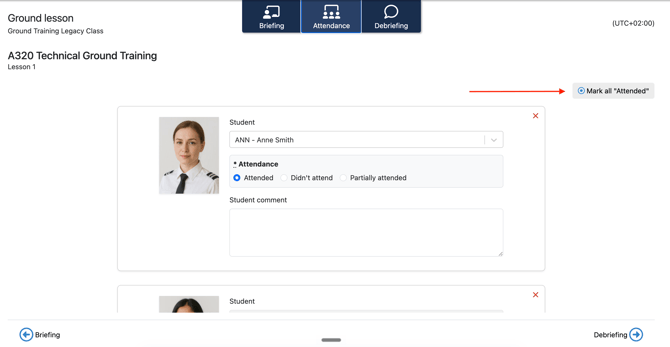
- Click the Attendance tab.
- To mark everyone as present, click Mark all "Attended."
- For a student who missed the session entirely, select Didn't attend on their row.
- For a student who only attended part of the session, select Partially attended, then:
- Click the calendar icon to set the date the student attended until.
- Use the clock to adjust the hours the student attended.
Adding a debriefing
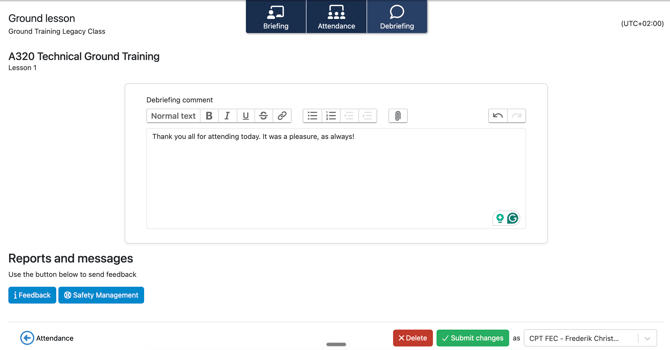
- Click the Debriefing tab.
- Use the debriefing area to write an overall summary of the ground session.
- If you need to raise something separately, use the buttons at the bottom to send Feedback or open Safety Management.
- Click Submit to complete the registration.
Note: Once submitted, the session is marked complete and the attendance record is saved to each student's profile.
Checking attendance across a class
To review how a class is progressing overall:
- Go to the ground training program overview for the class.
- Click a subject to expand it and see the attendance registered for that subject.
Need more help?
If you have any further questions, please contact FlightLogger Support via the Get Support button inside your platform.