
Interactive walkthrough
Follow along with this step-by-step walkthrough of the full registration process, from confirming the booking to reviewing cancelled bookings for the class.
Confirming the booking
- Open the session from your booking overview.
- Click Proceed to complete the booking registration.
Adding documents
- Click Add documents.
- Attach the relevant materials to the lesson briefing.
Recording attendance
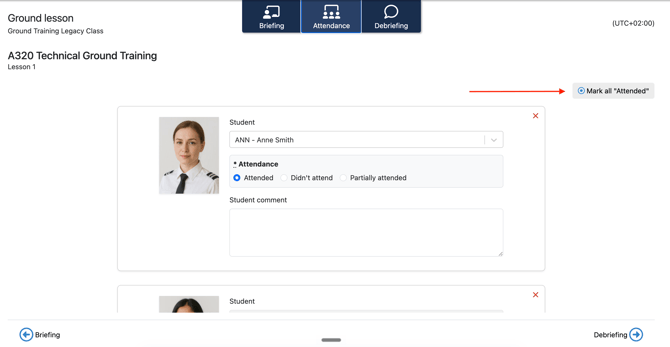
- Click the Attendance tab.
- To mark everyone as present, click Mark all attended.
- If a student didn't attend, use the Didn't attend option next to their picture.
- If a student attended only part of the session, click Partially attended, then:
- Use the calendar icon to define the period the student attended.
- Click outside the calendar selection to close it.
Adding a debriefing
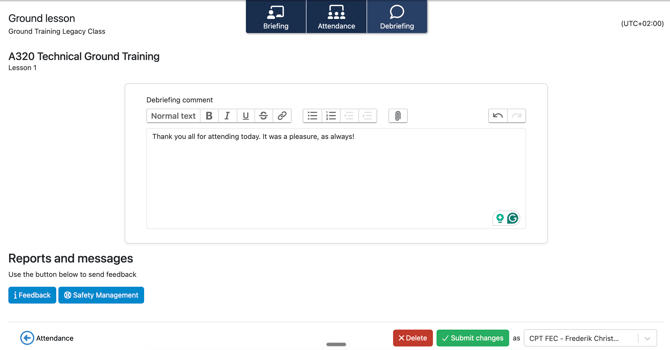
- Click the Debriefing tab.
- Use the comment section to write your debriefing notes on the session.
- Use the Feedback button and the Safety Management button to send feedback or raise a safety report to the academy.
- Click Submit Registration to finalize the session.
Note: Once submitted, the session is marked complete and the attendance record is saved to each student's profile.
Reviewing class progress
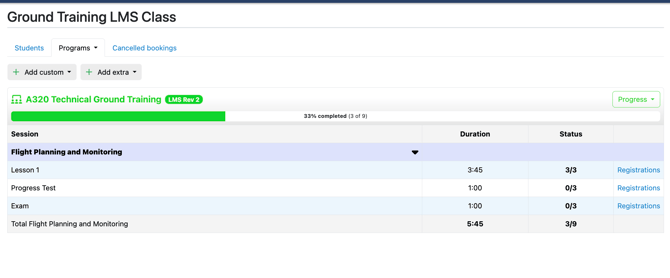
The program overview provides a summary of the subjects and sessions the students in the class have attended.
Reviewing cancelled bookings for a class
Use the Cancelled bookings tab to review any cancelled training sessions for the class.
Need more help?
If you have any further questions, please contact FlightLogger Support via the Get Support button inside your platform.