
We’re excited to announce the first major update of 2026, featuring great additions to differentiate between missing certificates that block operations or not, as well as new repetition classifications & hold items for flight training.
Watch this video for an introduction to the new features:
Here’s what’s included in this release:
-
Block Bookings & Registrations through relevant Certificates
-
Repetition Lessons with Performance Classification
-
Max Roll Down on the Hold Item List
-
Advanced Upset Prevention and Recovery Training (AUPRT)
Continue reading for full details.
Block Bookings & Registrations through relevant Certificates
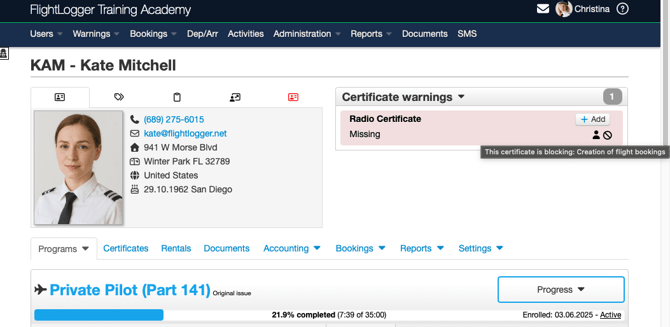
We're introducing enhanced flexibility in certificate management with the new Blocking Certificate feature. This update addresses client feedback requesting more precise control over which certificates should prevent bookings and registrations when missing, expired, or requiring approval.
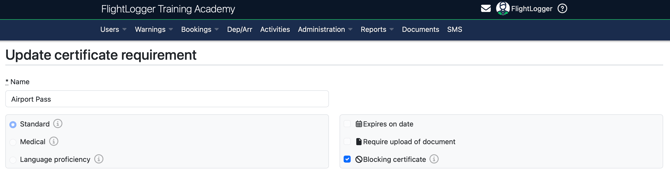
Each certificate can now be individually configured as "blocking" or "non-blocking" through a new checkbox option in the certificate creation and editing interface. This provides granular control over certificate enforcement policies.
Key Features
Enhanced Certificate Configuration
- New "Blocking certificate" option
- Always editable - unlike other certificate options, the blocking status can be modified even when certificates are in use
A certificate will prevent actions when BOTH conditions are met:
- The certificate requirement is marked as "Blocking certificate" in Administration -> Requirements -> Create
- The relevant Account setting for "Block if certificates are missing, expired, or requiring approval" is enabled for blocking of flight/theory registrations or bookings
Migration
Existing Certificates: All current certificates have been automatically migrated to "Blocking certificate" status enabled, maintaining existing blocking behavior.
Benefits
- Selective Enforcement: Mark critical safety certificates as blocking while allowing operational flexibility for administrative certificates
- Operational Efficiency: Reduce unnecessary booking/registration blocks while maintaining safety compliance
This enhancement enables flight training organizations to implement more nuanced certificate policies that balance operational flexibility with regulatory compliance requirements.
Repetition Lessons with Performance Classification
We're excited to introduce a significant enhancement to our repetition lesson system that provides more granular control and clearer categorization of repetition reasons. This update addresses instructor feedback requesting better distinction between student performance-related and outside coming operational factors, requiring lessons to be repeated.
What's New
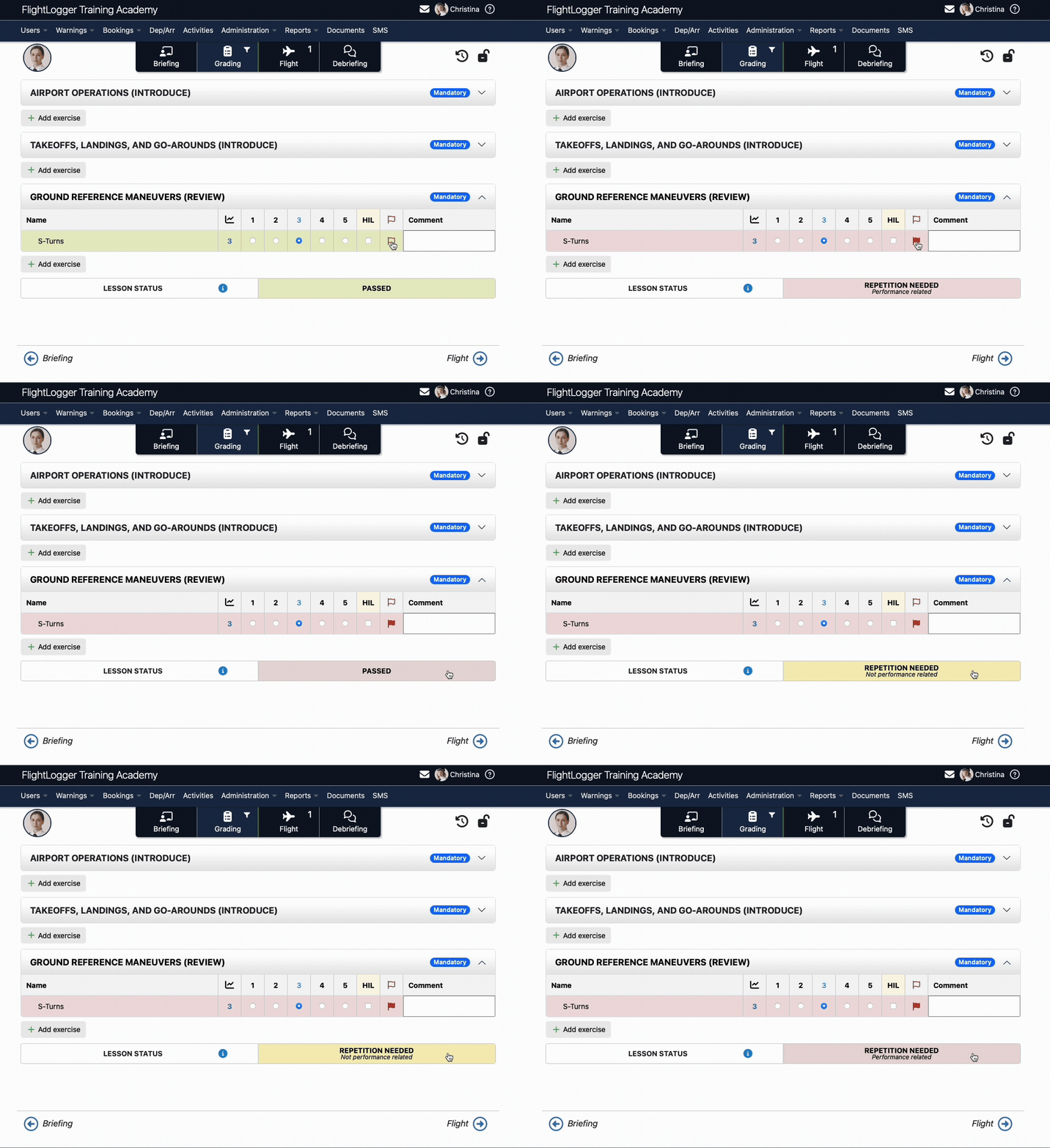
Getting a quick overview of why students have repetition lessons has now never been easier. The lesson status button now cycles through three distinct states instead of the previous two:
- PASSED (Green) - Exercise completed successfully
- REPETITION NEEDED - Not performance related (Yellow) - Repetition required for operational reasons (weather, equipment, scheduling)
- REPETITION NEEDED - Performance related (Red) - Repetition required due to student performance concerns
When an exercise is flagged (manually or through autoflag), the system now defaults to "REPETITION NEEDED - Performance related" to ensure proper oversight of performance concerns.
How It Works
- During Lesson Registration: Instructors can cycle through the three lesson status options by tapping the status button
- Automatic Flagging: When exercises are flagged, the system defaults to performance-related repetition status
- Syllabus Integration: Both types of repetitions automatically insert repetition lessons into student syllabi with all flagged exercises
- Administrator Notifications: Repetition administrators receive tailored notifications based on the repetition type
Data Migration
All existing "REPETITION NEEDED" lessons have been automatically migrated to "REPETITION NEEDED - Performance related" to maintain consistency with historical performance tracking. As a result, previously yellow repetition lessons are now displayed in red to reflect their performance-related classification.
Reporting Updates
- Raw data reports now distinguish between "REPETITION NEEDED Performance related" and "REPETITION NEEDED Not performance related"
- API responses have been updated to reflect the new categorization
This enhancement provides better tools for tracking and managing different types of repetition requirements, enabling more targeted interventions and clearer performance documentation.
Max Roll Down on the Hold Item List
We're introducing a powerful new account setting that ensures hold item list exercises are completed within a specified following number of lessons, preventing important training elements from being indefinitely delayed. This feature addresses client requests for better control over hold item exercise management and completion accountability.
What's New
Maximum Lesson Limit Setting
A new account setting allows organizations to set a maximum number of lessons within which hold item list exercises must be completed after being created. This setting appears as an indented option under "Enable blocking of flight registrations".
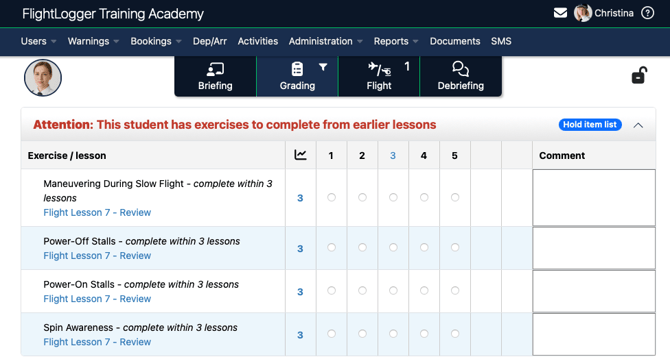
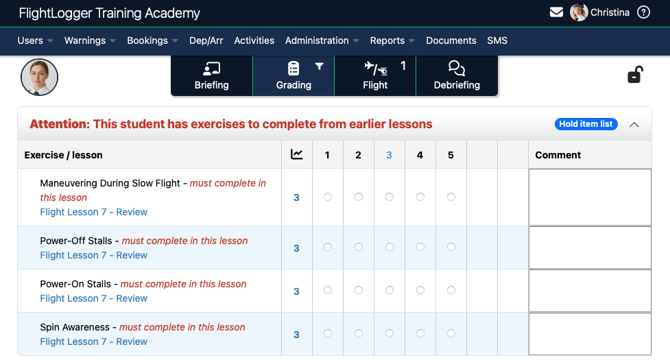
When the feature is enabled, hold item exercises now display exactly how many lessons remain until they must be completed, providing clear visibility into approaching deadlines.
Key Features
The system calculates maximum lessons based on actual completion of lessons rather than lesson sequence order. For example, if blocking within 3 completed lessons and an exercise is marked as a hold item on Lesson 10, and the next completed lessons are 11, 13, and 14 (skipping 12), the three-lesson limit applies to lessons 11, 13, and 14.
How It Works
For Administrators:
- Navigate to Account settings -> General settings under "Enable blocking of flight registrations"
- Enable "Block if hold item list is not completed within within X lessons"
- Set the desired maximum number of lessons
- The feature automatically applies to all new hold item exercises across all flight training programs
For Instructors:
- Hold item exercises display remaining lesson counts during lesson registration
- Visual warnings appear when approaching the final lesson opportunity
- Clear error messages prevent registration if limits are exceeded
This enhancement helps flight training organizations maintain training quality and ensure that important hold item exercises receive timely attention, supporting more structured and accountable training progressions.
Advanced Upset Prevention and Recovery Training (AUPRT)
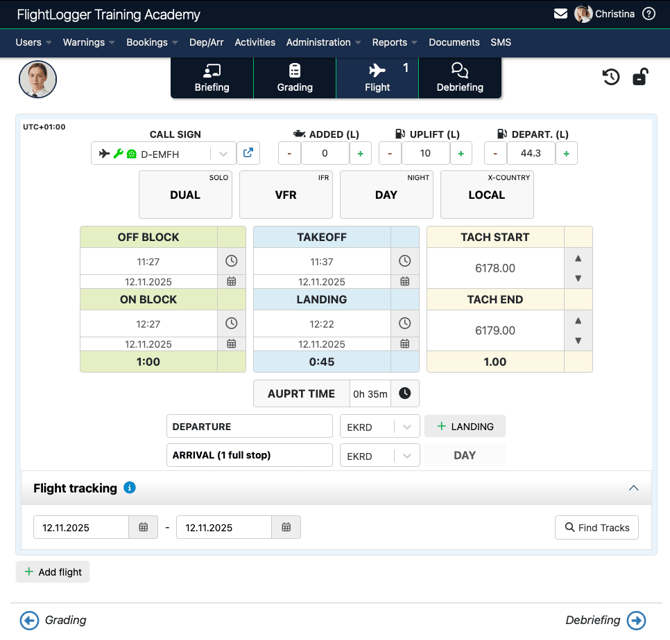
Further for flight training we're excited to announce comprehensive support for Advanced Upset Prevention and Recovery Training (AUPRT) logging, addressing the growing demand from EASA training organizations to explicitly log AUPRT time. This update also includes significant improvements to existing Instrument Flight (IF) and Asymmetric Training (AT) management.
What's New
Complete AUPRT Integration
FlightLogger now supports full AUPRT logging capabilities, allowing organizations to track and document this compulsory EASA training requirement with the same precision as other specialized training types.
Self-Service Training Type Management
Training type controls have been giving organizations direct control over enabling Instrument Flight (IF), Asymmetric Training (AT) and the new Advanced Upset Prevention and Recovery Training (AUPRT) registration.
How It Works
For Administrators:
- Navigate to Account Settings → General Settings → Registrations
- Enable desired training types (IF, AT, AUPRT)
- Configure aircraft flight logs and program revisions accordingly
Aircraft Flight Logs
AUPRT time logging can now be configured under the aircraft special flight logs: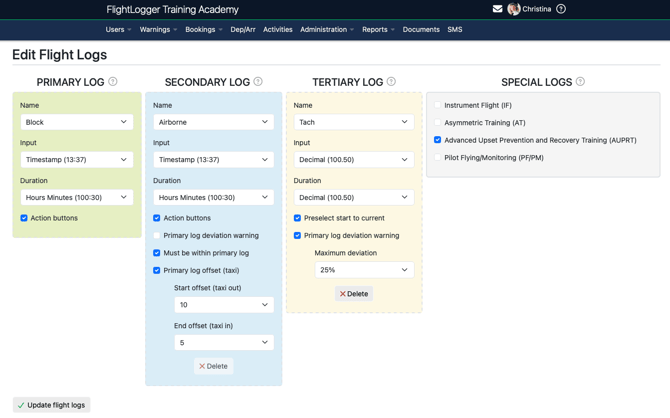
Program-Level Configuration
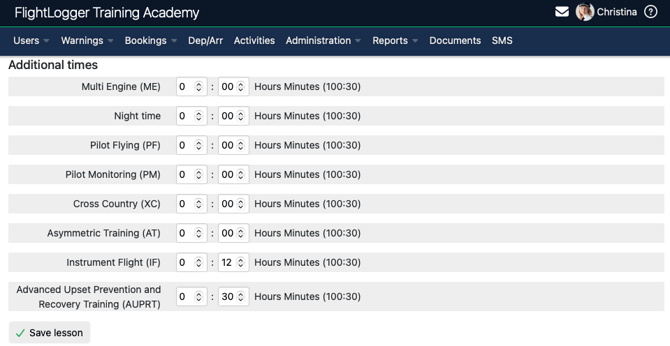
Adding the AUPRT time to a Program Revision is a non-breakable change allowing administrators to easily add this to existing programs that require this under individual lesson's AUPRT syllabus time requirements:
Minor enhancements and bug fixes
As with every release, this update includes additional enhancements and important stability improvements across the platform. We greatly appreciate all of your valuable feedback, bug reports, and suggestions—your input continues to shape the evolution of FlightLogger. Thank you for being an engaged part of our community and helping us deliver the best possible flight training management experience.
If you have questions or want to share ideas, our team is always here to help.
Warm regards,
The FlightLogger Team