
On Wednesday May 6 at 06:00 UTC we're releasing the 5th major update of the year. No downtime is expected for this release.
We’re excited to introduce another major update to FlightLogger. This release brings improvements across training content, scheduling flexibility, and billing workflows—including AI-assisted features, enhanced visibility, and a more powerful User Balance Module.
Watch this short video for an introduction:
New features coming with this update:
-
Smarter exercise content with AI support
-
More flexible session types & booking experience
-
Enhanced aircraft information on the booking page
-
User Balance Module - Expanded billing & automation
- Minor improvements and bug fixes
Read below for more details.
Smarter Exercise Content with AI Support
We’ve significantly enhanced how exercises work in FlightLogger, making them more informative and directly connected to training material.
With this update, you can now:
- Add descriptions to each exercise
- Make exercise names clickable links to SOPs, videos, or reference material
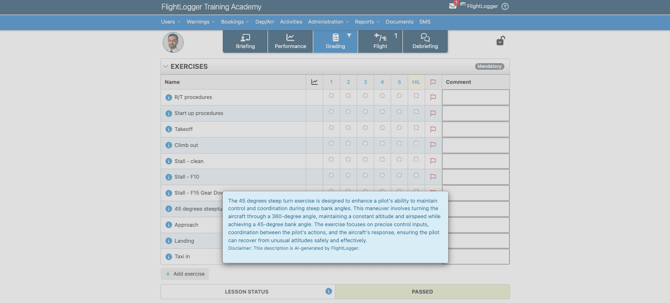
- View exercise information directly in the Grading tab
- Use AI-generated descriptions to get started instantly
The exercise content is managed in the Master Exercise List. Here, you can auto-generate exercise descriptions or add your own descriptions or links to external content.
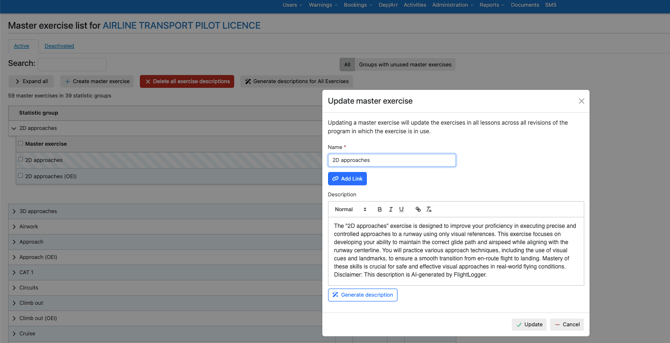
NOTE
AI generated content is to be used with care. The validity of exercise descriptions is your own responsibility and we recommend that you always verify AI-generated content before publishing.
Once published, the exercise descriptions can be opened by clicking the Info-icon on the grading tab of flight lessons.
Why this matters
- Give instructors and students better context during training
- Connect theory and grading more effectively
- Reduce briefing time with embedded guidance per exercise
- Maintain full control with editable and removable AI content
More Flexible Session Types & Booking Experience
We’ve expanded how session types are handled across both ground and flight training.
You can now:
- Customize session terminology to match your operation
- Use different session types in flight training programs
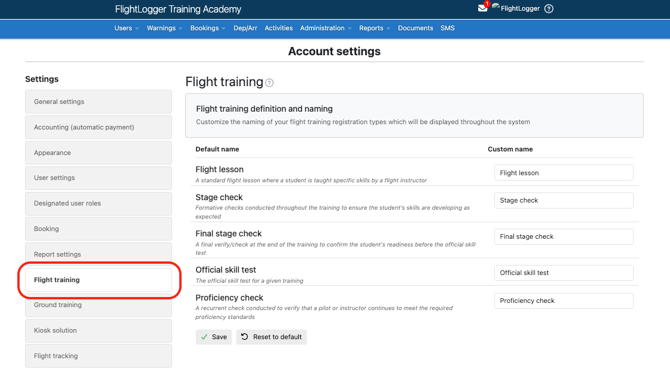
The session terminology can be customized from the Account Settings in the Flight Training and Ground Training sections respectively. Note that we have kept all existing naming as it is today, so please manually update if you want to switch the naming.
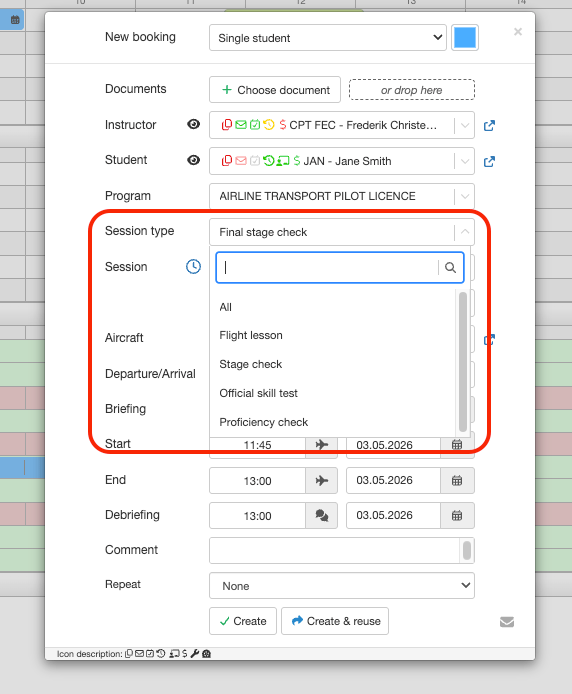
Set session type on Flight Lessons
We have added flight training session types which means that you can now define the session type of each lesson in your flight training programs.
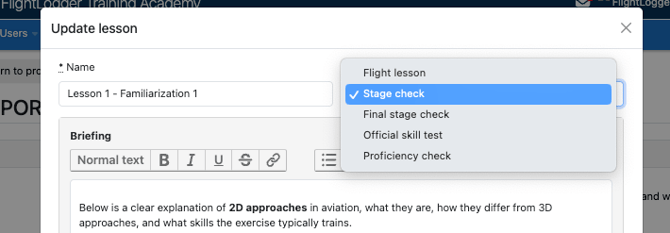
Once the program has been set up (this is a minor change so it allowed to be done on active programs), the session type can be selected when scheduling a training session.
Why this matters
- Align terminology with regulatory and operational needs
- Improve scheduling clarity and efficiency
- Create a more flexible and scalable training setup
Enhanced Aircraft Information on the Booking Page
We’ve improved the Booking page to give you an option for more operational insight directly where scheduling happens.
You can now:
- Display maintenance data (hours, cycles, days remaining)
- Customize aircraft boxes with relevant information
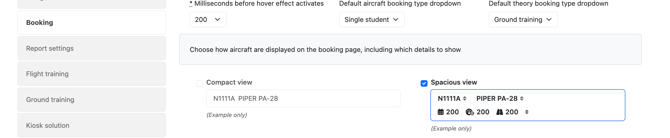
- Choose between compact and spacious layouts
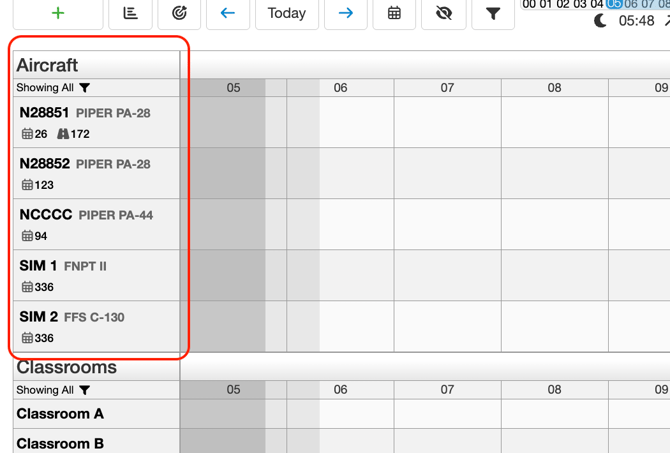
You can switch between the standard view and the Spacious view in the account settings in the Bookings section.
Why this matters
- Reduce the need to switch between pages
- Make better decisions when scheduling aircraft
- Adapt the interface to your workflow
User Balance Module – Expanded Billing & Automation
We’ve introduced several powerful improvements to the User Balance Module, making billing more flexible, automated, and aligned with real-world operations.
What’s new
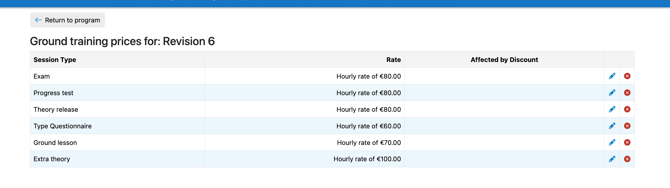
Ground training pricing & automatic charging
- Set hourly or fixed pricing per session type
- Automatically charge completed sessions based on attendance and rules
- Apply price lists and discounts across program revisions
Ground training prices can be set up from Administration -> Programs and then on the selected ground training program revision by selecting Prices.
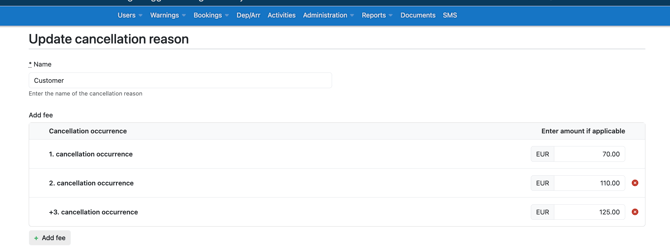
Cancellation fee tiers
- Configure automatic fees based on cancellation reasons
- Increase fees based on repeat occurrences (e.g. no-shows)
- Automatically post charges and corrections to student balances
Cancellation fees are set up from Administration -> Cancellation reasons
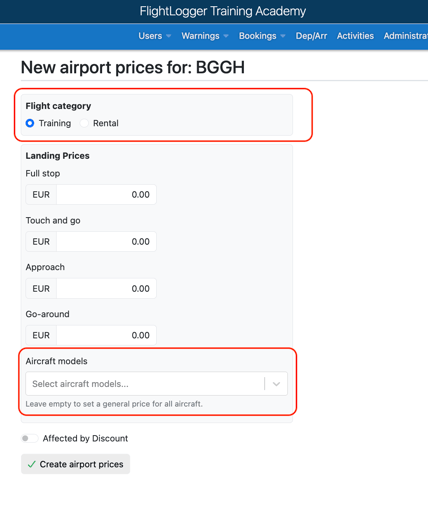
Landing fees with more precision
- Set landing fees based on flight type and aircraft model
- Support different pricing for training vs. rental flights
- Override general pricing with model-specific fees
New options found in Administration -> Airports:
Why this matters
- Automate previously manual billing workflows
- Gain greater control over pricing structures
- Ensure consistent and accurate balance handling
- Better reflect real-world operational and financial scenarios
Other Minor Improvements in This Release
- Improved offline reliability in FlightJS, preventing data loss during connectivity changes
- Role-based visibility for wall posts, enabling targeted communication
- Improved privacy for multi-student bookings, hiding cancellation reasons where appropriate
This update continues our focus on making FlightLogger a more intelligent, flexible, and operationally efficient platform.
If you have any questions or would like help getting started with the new features, feel free to reach out to our support team.
Best regards,
Team FlightLogger