
We’re excited to introduce one of our most impactful updates yet.
This release brings brand-new AI-powered tools into FlightLogger, designed to help instructors better understand student progress, prepare lessons more effectively, and save time on manual review of training data.
Alongside these new capabilities, we are also introducing several improvements to lesson structure, data visibility, and administration workflows.
Watch this short video for an introduction:
What’s included in this update?
These are the main headlines of the upcoming update:
-
AI-generated Student Summary
-
Student Grading Insights
-
New Student Debriefings Overview
-
New Performance Tab in Lesson Registrations
-
Partially Completed Lessons
-
Improved User Permissions Overview
- Lots of Minor Improvements and a Couple of Bug Fixes
AI-Generated Student Summaries
At the core of this release is a completely new feature: the AI-generated Student Summary.
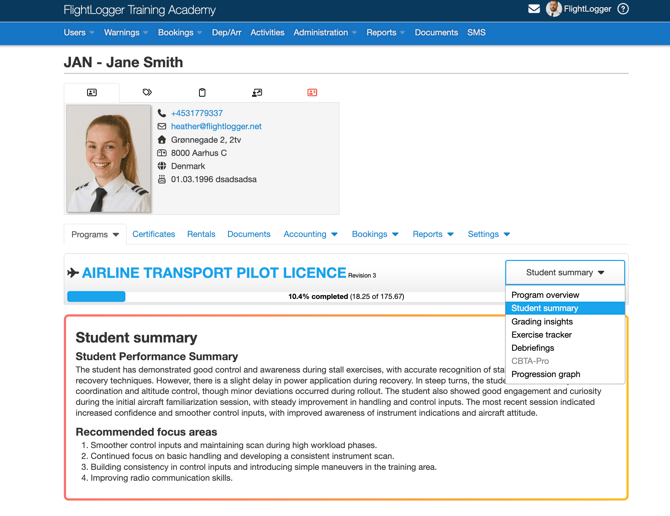
This feature automatically analyzes instructor debriefings from the three most recent completed lessons and turns them into:
-
A short performance summary (50–100 words)
-
A set of recommended focus areas for the next lesson
All summaries follow a consistent format and are generated in the same language as the original debriefings.
Below is an example of how an AI-generated student summary can look based on debriefing comments:
Why this matters
-
Instructors get a quick overview of student progress without reading multiple debriefings
-
Improve lesson preparation with clear, AI-suggested focus areas based on real data
-
Ensure consistent evaluation across instructors and students
-
Save time and improve insights for both instructors and administrators
Note that if there is not enough debriefing data available, FlightLogger will clearly explain why a summary cannot be generated and guide you on what is required to make it available.
Disclaimer: As the content is AI-generated, we recommend that your instructors initially verify the summary by also using the new Debriefings View introduced below.
Student Grading Insights (live just after Easter)
Another valuable student evaluation tool can be found in Grading Insights, the perfect place to see how a student is performing compared to other students on the same program, lesson by lesson. Note that Student Grading Insights will first be available right after Easter.
In the below example you can see how the student JAN is generally performing a bit better than other students on the ATPL program.
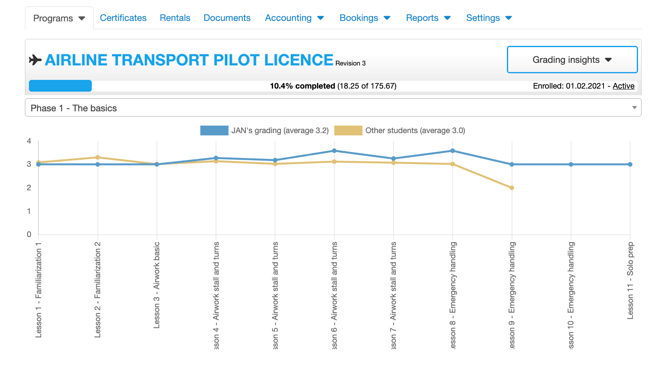
The data can be filtered by phase, allowing the instructor to dive into what's most relevant at the time.
New Debriefings Overview
We are also introducing a dedicated Debriefings overview inside the student folder. This new view gives you a structured and searchable overview of all lesson debriefings in one place.
Here's an example of a Debriefing Overview:
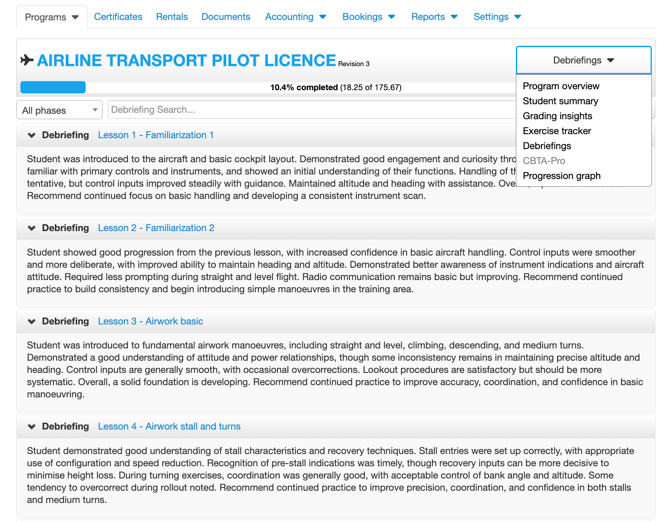
With this update, you can:
-
Browse all debriefings across completed lessons
-
Search and filter by lesson or phase
-
Expand/collapse entries for easier reading
-
Export debriefing data
-
Open lessons directly in a new tab
This makes it much easier to review student history and follow up on previous training notes.
Improved “Performance” Tab in Lessons
To support these new insights and make then even more accessible for instructors when needed, we have improved the Performance tab in the lesson registration page.
The enhanced Performance tab acts as a central hub for student insights and includes:
-
AI Student Summary
-
Grading Insights (improved graphs and comparisons)
-
CBTA-Pro analysis on CBTA-enabled programs
Here's an example of the updated Performance tab:
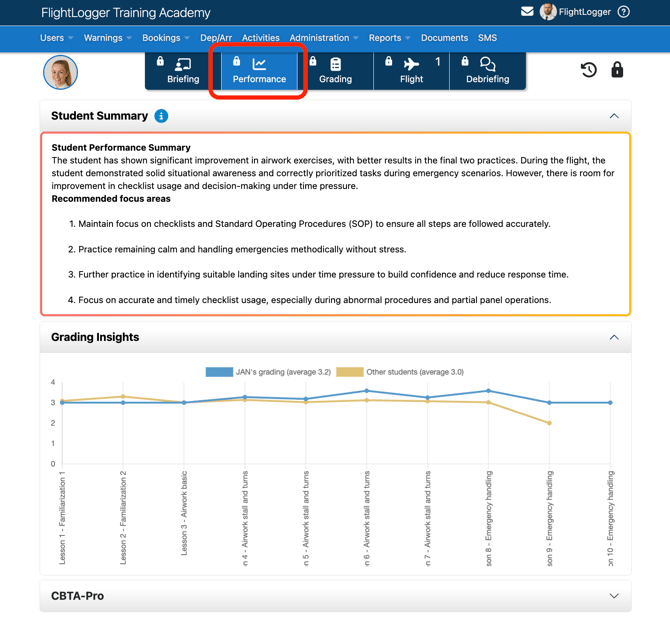
This creates a more consistent and intuitive experience while bringing key performance data together in one place.
Partially Completed Lessons
We are introducing a new way for instructors to handle lesson registrations more efficiently — Partially Completed Lessons.
In many cases, instructors are not able to complete student grading and comments during the lesson itself. As a result, flight registrations are often delayed until later, which can create compliance challenges and missing or delayed registrations when aircraft are handed over between instructors.
With this update, instructors can now:
-
Submit just the flight registration immediately after the lesson
-
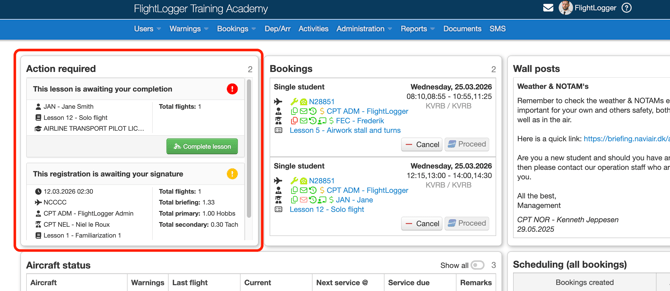
Complete grading and comments at a later time, for example via their Action Required widget on their front page.
.gif?width=670&height=383&name=Untitled%20(1).gif)
Instructors can then complete partially completed registrations from their front page:
Why this matters
-
Ensure correct registration of aircraft flight logs - right after flight completion to avoid aircraft overflying and flight logs getting out of order
-
Ensure timely and compliant flight registrations
-
Reduce administrative pressure during or immediately after lessons
-
Allow instructors to provide more thoughtful and accurate evaluations later
-
Improve overall workflow without compromising data quality
This change makes it easier to balance operational requirements with high-quality instruction, giving instructors more flexibility while maintaining compliance.
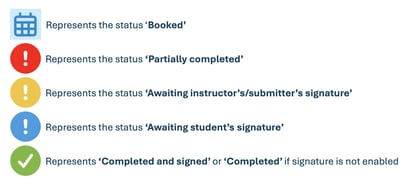
Tip: Get to know the icons on the Student Page
Ever wondered what the different icons on the student's program overview represented? Here's a quick explanation:
Improved User Permissions Overview
We’ve made it much easier to understand and manage user permissions.
A new “Total permissions” view now shows:
-
A complete overview of a user’s effective permissions
-
Where each permission comes from (role vs. personal override)
-
Direct links to related role settings
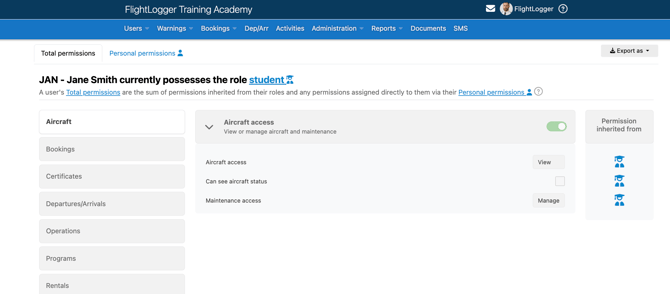
This improves transparency, simplifies troubleshooting, and makes permission management safer and faster.
Other Minor Improvements
In addition to the major features above, this update includes several smaller but important improvements:
-
Standardized lesson & registration status icons for better clarity across the platform
-
More flexible booking permissions, with clearer naming and more granular control
-
Improved “Grading insights” graphs with clearer labels and better comparison data
-
New “Action required” widget, replacing approval/signature widgets with a unified workflow
-
New accounting API, enabling external systems to sync student payments and balances
On top of this, our product team has made lots of minor adjustments and a few bug fixes to support the new features. Most of them you will not notice, but feel free to reach out to us if you experience any problems or if you have questions or suggestions. As always, we will be ready to respond from support@flightlogger.net.
All the best,
The FlightLogger Team