
We’re excited to announce our eleventh major update this year, featuring the release of an all-new module available for all customers to try free of charge through March 31, 2026. To ensure the best experience, we’re starting with a Beta release for selected customers over the next couple of weeks—details below. In addition, we’re introducing a highly requested improvement to our Safety Management Module (SMS), as well as general enhancements and fixes throughout the platform.
Watch our brief 2-minute video for an overview of the latest features:
Here’s what’s included in this release:
- New Student Progression Module (Beta release for selected customers)
- SMS module now supports ECCAIRS (E5X) file export
- Minor enhancements and bug fixes
Continue reading for full details.
New Student Progression Module (Beta release for selected customers)
We’re pleased to present the brand-new Student Progression Module, now available in Beta for a selected group of customers and scheduled for general availability within the coming weeks.
Developed in response to demand from schools looking for better insight into student progress, this module provides a clear, program-wide overview of each student’s training journey—so you can quickly identify who is ahead, on track, or falling behind, and prioritize support where it’s needed.
How it works
For every student, you can set both an expected training program start date and an expected completion date. FlightLogger then calculates the recommended training pace—the number of lessons per week needed to complete the program as scheduled. You’ll also see the actual start date, automatically based on the first lesson logged.
As the student progresses, FlightLogger compares their actual pace to the recommended pace, projecting whether they’ll finish ahead of schedule, on time, or behind. The system provides a projected completion date based on ongoing performance. All of this information is instantly accessible through a new Progression card button on each student’s program overview.
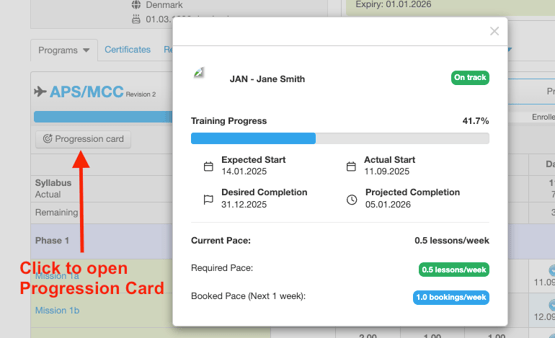
The Progression card showcases three key metrics:
- Current pace: The average number of lessons logged per week since the start of training.
- Required pace: The number of lessons per week needed to achieve the target completion date.
- Booked pace: The number of sessions scheduled for the upcoming week in the student’s training program. When the booked pace meets or exceeds the required pace, it’s highlighted in green or blue, respectively. If it falls short, it appears in red, alerting schedulers to give this student priority.
How to use the Student Progression Dashboard
With the introduction of the Student Progression Module, you now have access to a dedicated dashboard that tracks progression across entire training programs. Navigate to Users → Students, click the Progression button, and select the relevant class and program to monitor student progress in detail.
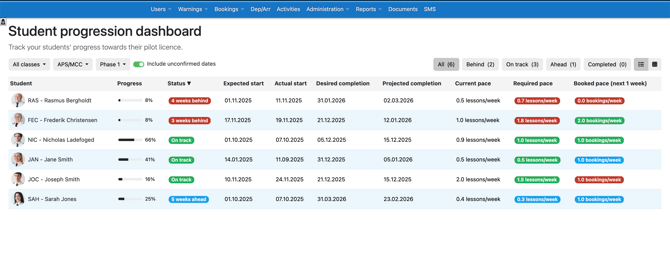
The Student Progression dashboard clearly highlights which students are ahead of schedule, on track, or falling behind, empowering you to make informed scheduling decisions that drive training success.
When planning schedules, simply refer to this dashboard to prioritize students who need additional support. By keeping the Booked Pace indicators in green or blue, you help ensure every student stays on track to complete their program on time.
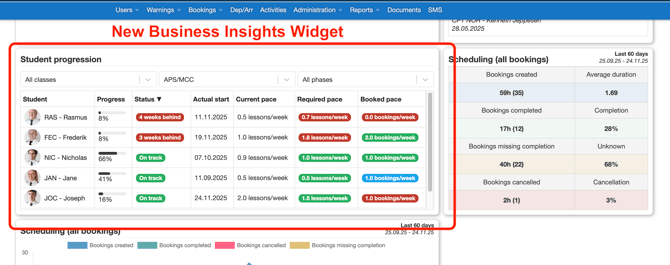
Note that the Student Progression dashboard is also available as a front page widget for schools using the Business Insights Module:
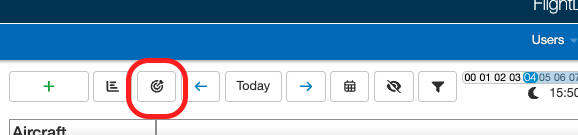
Also, you can open the Student Progression dashboard directly from the Bookings page, allowing you to have it open while setting up your schedule:
At launch, the Student Progression Module is available exclusively for flight training activities. Ground training integration is in development and will be added soon, providing you with complete oversight of student progress across all training areas.
All FlightLogger schools receive complimentary access to the Student Progression Module as part of a free trial through March 31, 2026—giving you plenty of time to experience its full benefits at no cost.
Join the Beta group
The Student Progression Module will be released in Beta for selected customers on Wednesday, November 26. If you can't wait to try it out, then please reach out to our support team and they can help you get started.
Send an email to support@flightlogger.net to be included in the Beta group.
SMS module now supports ECCAIRS (E5X) file export
The second big news coming in this update is a significant enhancement to the SMS module (Safety Management). Based on customer requests we are now adding the opportunity for your Safety Manager user to export Flight Safety reports ready to be submitted to ECCAIRS/ECCAIRS2.
As a Safety Manager, simply click the icon to export a report in the new format as required by safety authorities. The export is done as a Zip-file that includes a PDF and an XML file.

Not using the SMS module yet?
Reach out to our support team to schedule an online introduction to our SMS module. Send an email to support@flightlogger.net to get started.
Minor enhancements and bug fixes
As with every release, this update includes additional enhancements and important stability improvements across the platform. We greatly appreciate all of your valuable feedback, bug reports, and suggestions—your input continues to shape the evolution of FlightLogger. Thank you for being an engaged part of our community and helping us deliver the best possible flight training management experience.
If you have questions or want to share ideas, our team is always here to help.
Warm regards,
The FlightLogger Team