
We’re excited to introduce the first of two major updates that will bring Ground Training Programs with lesson content and revision control to FlightLogger. Once the full release is complete, you’ll be able to design structured ground training programs with subjects containing predefined training content - similar to how you already work with your flight training programs.
With this initial release, you get access to the program builder, enabling you to start creating your ground training programs now - in preparation for the full feature rollout.
Please watch this short video on the upcoming release.
What's the New Ground Training Setup?
We are introducing the first step toward a more powerful and structured Ground Training experience in FlightLogger. With this and the next update coming soon, Ground Training Programs gain lesson-based structure and revision control - bringing them closer to the way you already work with flight training programs.
In this initial release, you get access to the new Ground Training Program Builder, allowing you to start designing programs with subjects and optional predefined training content. This gives you a head start in preparing your ground training setup ahead of the full feature rollout.
Start Building Your New Ground Training Programs
Note
It's fully optional whether a ground training program should include predefined training content (PTC) or not. If PTC is not enabled for a revision, the program will continue to look and function exactly as it does today.
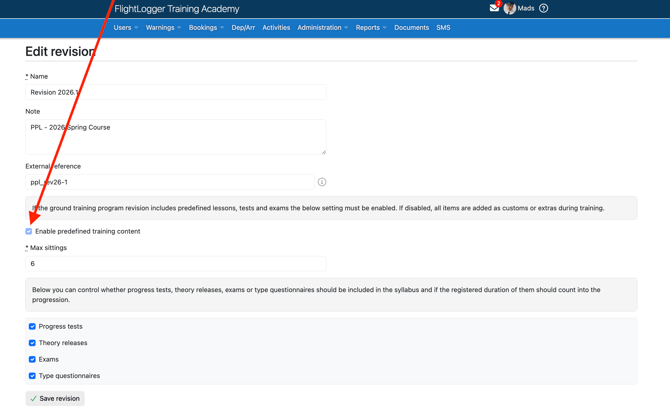
To enable predefined training content, either create a new revision of an existing ground training program or set up a new ground training program. In the new revision, simply activate predefined training content using this toggle.
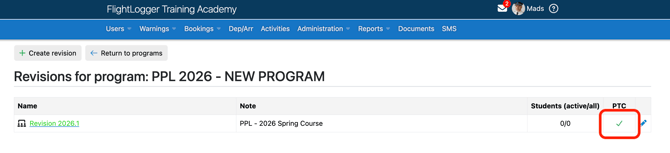
Once saved, you now have access to the builder for the selected revision, and you will see that the revision is marked to include PTC.
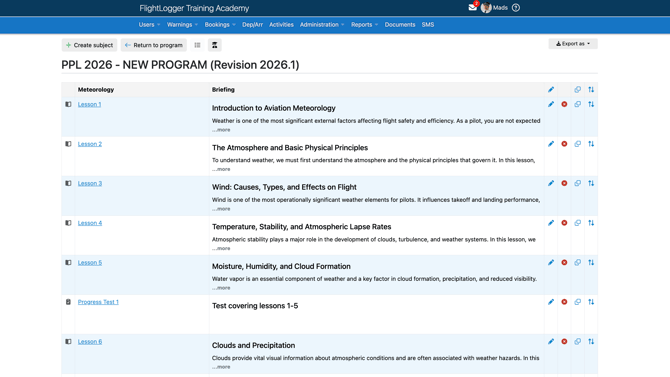
When opening the revision, the new ground training program builder looks similar to the program builder used for flight training programs.
You can now begin adding subjects to the training course. In this example, a Meteorology subject has been created with a number of lessons, tests, and exams. A preview of the briefing content of each session is included in the overview.
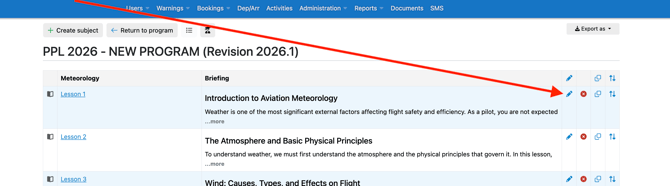
From here, you can edit and reorder each lesson and you can add more subjects to the program revision. Each lesson, test, etc. can be edited by clicking the pencil icon.
The Lesson Editor
This opens the lesson editor, where you can add briefing content such as text, links, images, and files from your Document Center. Depending on the revision settings, you can also adjust the scheduled syllabus time for the lesson.
All added content is available to instructors and students when they open the lesson in FlightLogger for preparation or during the session - just like briefing content in a flight lesson today.
Note that when adding Document Center files to a lesson, access rights are determined in the Document Center.
We therefore recommend that you create a folder for each program or subject, and ensure your students and instructors have access to this folder.
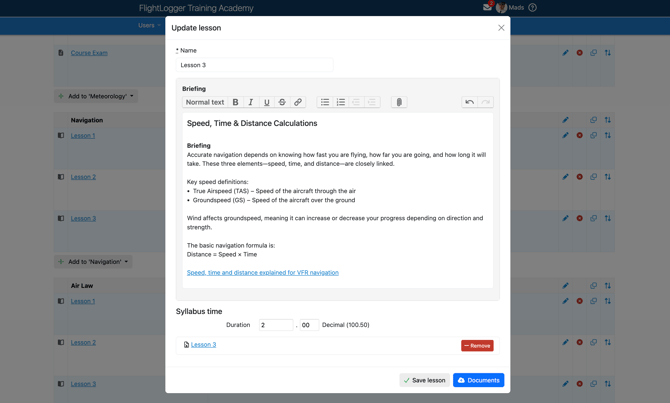
This allows you to build a full ground training program with all the subjects including a plan for lessons, tests, exams, etc.
What’s the Next Step?
As mentioned at the beginning, this is the first step in a two-step release. We recommend that you start building your ground training programs now, while our development team finalizes the second step. This upcoming update will enable you to assign students to your new programs as well as schedule and log your ground training sessions. The second step is planned for release toward the end of February (subject to change), giving you time to prepare your programs in advance.
We would really value your feedback on the program builder. If you have any questions, suggestions, or encounter any issues, please don’t hesitate to contact our support team at support@flightlogger.net.
All the best,
The FlightLogger Team