
A few weeks ago, we released the first of two major updates introducing the new Ground Training LMS in FlightLogger. We are now pleased to release the second update, making it possible for you to start using ground training programs in a setup that mirrors the flight training workflow you already know.
As part of this launch, all FlightLogger schools receive 5 months of free access to test and explore the new Ground Training LMS (see details below).
Please watch this short video for a quick introduction.
Before You Get Started
If you have not yet read our initial announcement introducing the Ground Training LMS, we recommend doing so first. You can find it here.
What’s Included in This Update?
With this release, the Ground Training LMS is now fully operational and ready to use.
You can now:
-
Assign ground training programs to individual students
-
Assign ground training programs to an entire class
-
Schedule ground training sessions for assigned students or classes
-
Allow instructors to log ground training sessions using a workflow similar to flight training
If you have already created your first ground training programs, you can begin assigning and scheduling them right away.
If you have not yet created any ground training programs, your first step will be to build your LMS programs before assigning them to students or classes.
What’s Coming Next?
This release marks the beginning of our expanded LMS functionality. Additional features planned for release later this year include:
-
Multiple-choice tests
-
Self-study lessons
-
An integrated syllabus combining ground and flight training programs
These upcoming enhancements will further strengthen FlightLogger as your all-in-one training management and LMS solution.
The Ground Training LMS is in free trial until August 1st 2026
To give all of you a good chance to evaluate the Ground Training LMS and how it fits into your current operation we have decided to make the Ground Training LMS completely free for the next 5 months.
During the free trial you can use all the new features at no cost, allowing you to evaluate it thoroughly.
Further details at the bottom of this page.
Assigning ground training program to a class
First, let's start with the easiest way to assign a ground training program to users - as a new thing this can now be done in bulk for an entire class.
Simply go to Administration -> Classes and select the relevant class (or create a new class if needed).
Select the Programs tab and then + ADD program. Then select the relevant ground training program and Add program.
Once the class has been enrolled, you now have the complete class program overview.
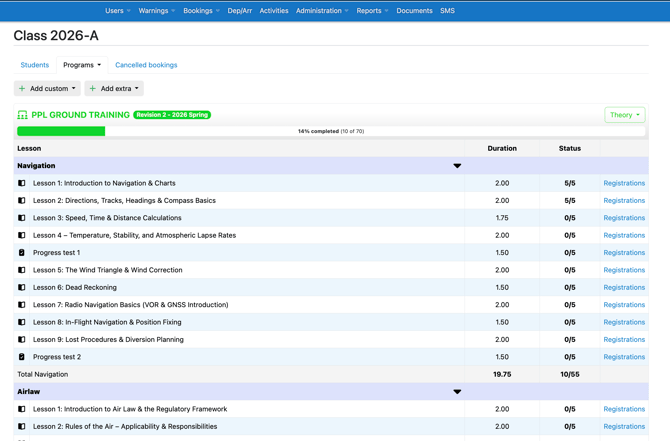
The overview provides useful info on each ground training session including how many of the students have completed each session. From here, you can also add custom and extra ground training sessions using the buttons.
Scheduling a ground training session
Scheduling a ground training session works exactly as when scheduling flight sessions.
Go to the Bookings page and create a new booking, selecting the appropriate session type, instructor, class, program, subject, and lesson (note that Class Theory is now Ground Lesson).
Remember that you can use the clock icon to adjust the length of the booking to the chosen lesson. Super simple.
.gif?width=670&height=380&name=scheduling%20(1).gif)
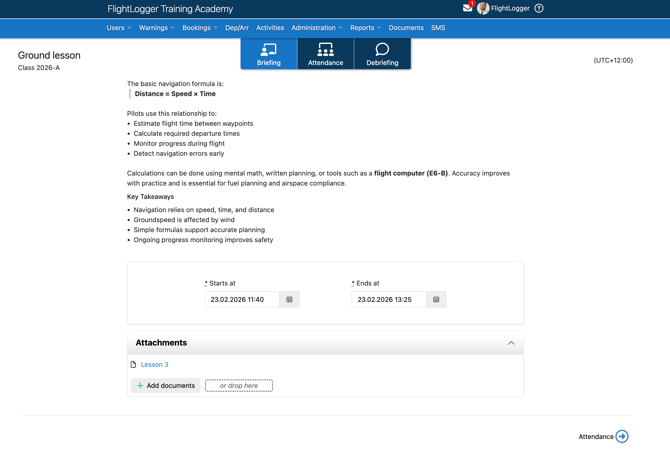
The registration of the ground training session is done as normal, but note that all lesson content including documents and links are directly available from the lesson, both during the session and for the students doing their preparation.
Updates to the Students program overview
With this update we have also added some improvements to the program overview on the students page (only for LMS programs - non-LMS programs will continue to look as today).
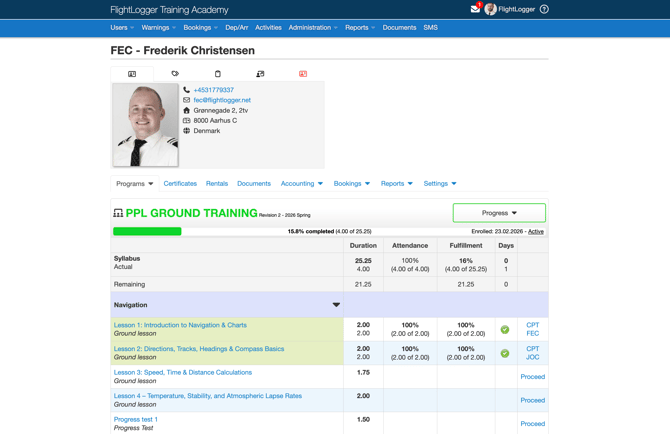
The most important improvement is that we have added a column called Fullfillment. This provides information about the student's attendance against syllabus time (where the Attendance column shows attendance against total time offered to the student). Many of you have asked to be able to see the fulfillment info, so we're happy to introduce it here.
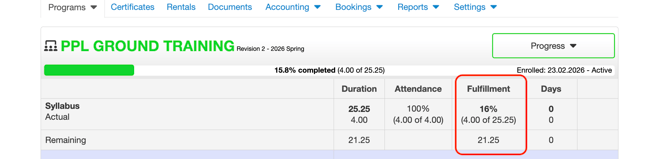
Also notice that the progress bar now highlights fulfillment, based on request from many schools.

Minor adjustments and bug fixes
On top of what we introduce here, our developers have made lots of minor adjustments to support the new features. Most of them you will not notice, but feel free to reach out to us if you experience any problems or if you have questions or suggestions. As always, we will be ready to respond from support@flightlogger.net.
All the best,
The FlightLogger Team
Practical info: Free Trial of LMS Module
Pricing. Upon expiry on the free trial, the LMS Module will be available as a paid add-on module. For pricing information, please reach out by email to support@flightlogger.
Should you decide not to continue using the LMS upon trial expiry, you will simply go back to the ground training setup that you have today. All students assigned to a LMS ground training program when the trial ends can of course be completed using the LMS-enabled program - nothing will be removed that's already active - but you will not be able to add new students to LMS programs.
Reach out to support team if you have any questions.